Product · Workplace Injury & Workers' Compensation

One operation. Five years. Here's what changed.

Digital First Report replaces paper forms, scattered emails, and disconnected spreadsheets with one open intake, automated notifications, a live claims dashboard, and an OSHA 300 log that maintains itself.

↓70%

Average cost per Work Comp claim — from $20,000 to under $6,000, year one and every year after.

↓20%

Work Comp premium reduction over five years.

↓20pts

Experience Modification Factor — the number every carrier prices you against.

What does airtight documentation actually cost?

One customer reduced their Work Comp claim costs by 70% in year one. Their mod dropped 20 points. Their premium is down 20% over five years.

The system didn't change how many incidents happened. It changed what those incidents cost once they did.

Your business runs on people. When they get hurt, how you respond determines what it costs.

Digital First Report is risk management technology built to reduce the cost of incidents before they become claims — replacing paper forms, scattered emails, and disconnected spreadsheets with one connected pipeline.

The challenges

Reporting doesn't look the same everywhere — but the failure points do.

High-volume, compressed windows

Whether it's a four-month ski season or a holiday retail surge, incident volume concentrates into a narrow window — and most reporting systems aren't built to keep up when it does.

Injured-employee reporting is broken

Paper forms. 24/7 operations. Employees who never return after an injury. SMS systems that require every user to have an account. Annual turnover that resets institutional knowledge.

Information lives in too many places

Risk Management, Safety, HR, the insurance carrier, the medical provider, the supervisor, and the employee — each holding a different piece. No single source of truth.

OSHA recordkeeping has hard deadlines

The OSHA 300 Log. 48-hour reportables. 8-hour reportables. Determining whether a claim belongs on the log at all. None of it forgives a missed update.

How it works

Four moving parts. One system.

01

Digital first report of injury

An open form anyone can fill out — no account, no app install. Posted as a QR code in break rooms, on radios, and in supervisor pockets.

02

Automated communication

A new report triggers confirmation to the employee, a notification to the supervisor, and the full investigation packet to Risk and HR — automatically, every time.

03

Claim & data visualization

A live dashboard for DART, open claims, incidents by location, and the operational metrics your GM actually asks about.

04

OSHA recordkeeping that maintains itself

Recordable logic, automatic DART calculation, days-away and restricted-duty tracking, and a weekly OSHA 300 log that emails itself.

Claims management

Nine steps from first report to a closed, compliant claim.

  1. 01

    First Report of Injury

    An employee or manager completes a digital First Report of Injury the moment an incident occurs.

  2. 02

    Automatic Notifications

    Instant email and text notifications go to HR, Risk Management, and the employee's manager.

  3. 03

    Investigate and Take Action

    The incident is investigated, root causes are identified, and immediate remediation begins.

  4. 04

    Open a Claim if Needed

    HR or Risk Management opens the claim with the insurance company, managed inside the system.

  5. 05

    Manage All Claim Information

    Incident number, claim contacts, medical paperwork, notes, and OSHA details in one record.

  6. 06

    Share with the Medical Provider

    The incident number and the right form templates go directly to the medical provider.

  7. 07

    Manage Medical Updates

    Doctor's notes and work restrictions are uploaded to the claim as they arrive.

  8. 08

    Determine OSHA Recordkeeping

    System-guided questions determine recordkeeping requirements and build the log entry.

  9. 09

    Automatic OSHA 300 Log

    The OSHA 300 log stays current and is emailed weekly to designated managers.

01 · Intake

A first report of injury anyone can complete.

An open digital form that works on any device, with no account required — built on platforms your IT department already uses, so there's nothing new to procure.

  • Open form fillable by anyone — employee, supervisor, witness
  • QR code and short link posted in break rooms and operational areas
  • Mobile-first: a phone is enough
  • Captures the data your investigation actually needs from the start
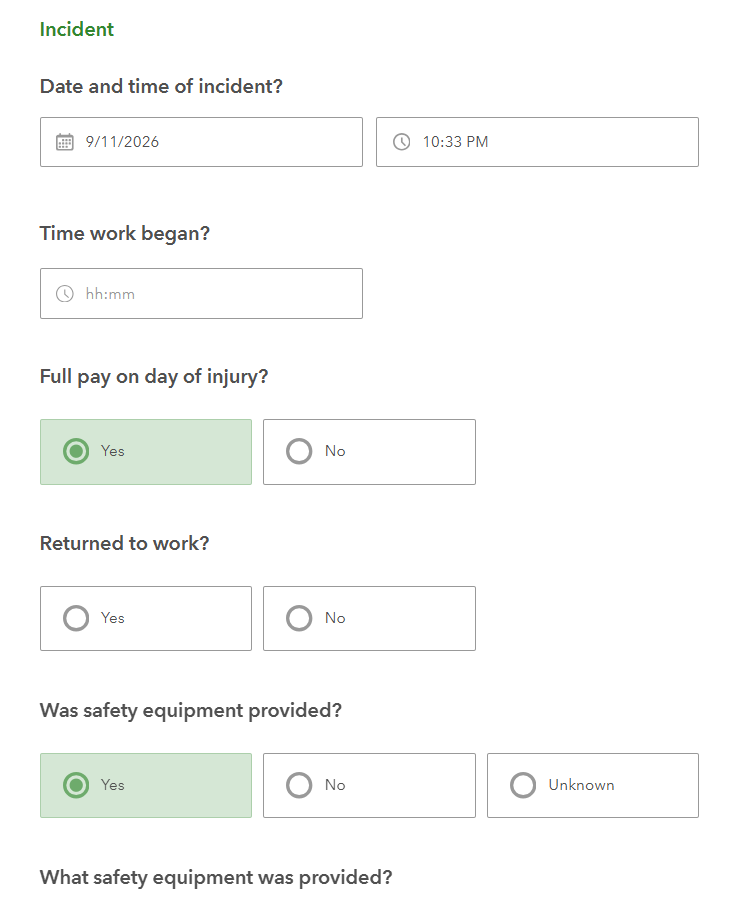
First report of injury form asking the incident date and time, time work began, pay on the day of injury, return to work, and safety equipment
First report of injury — the incident details step
02 · Routing

Communication that runs itself.

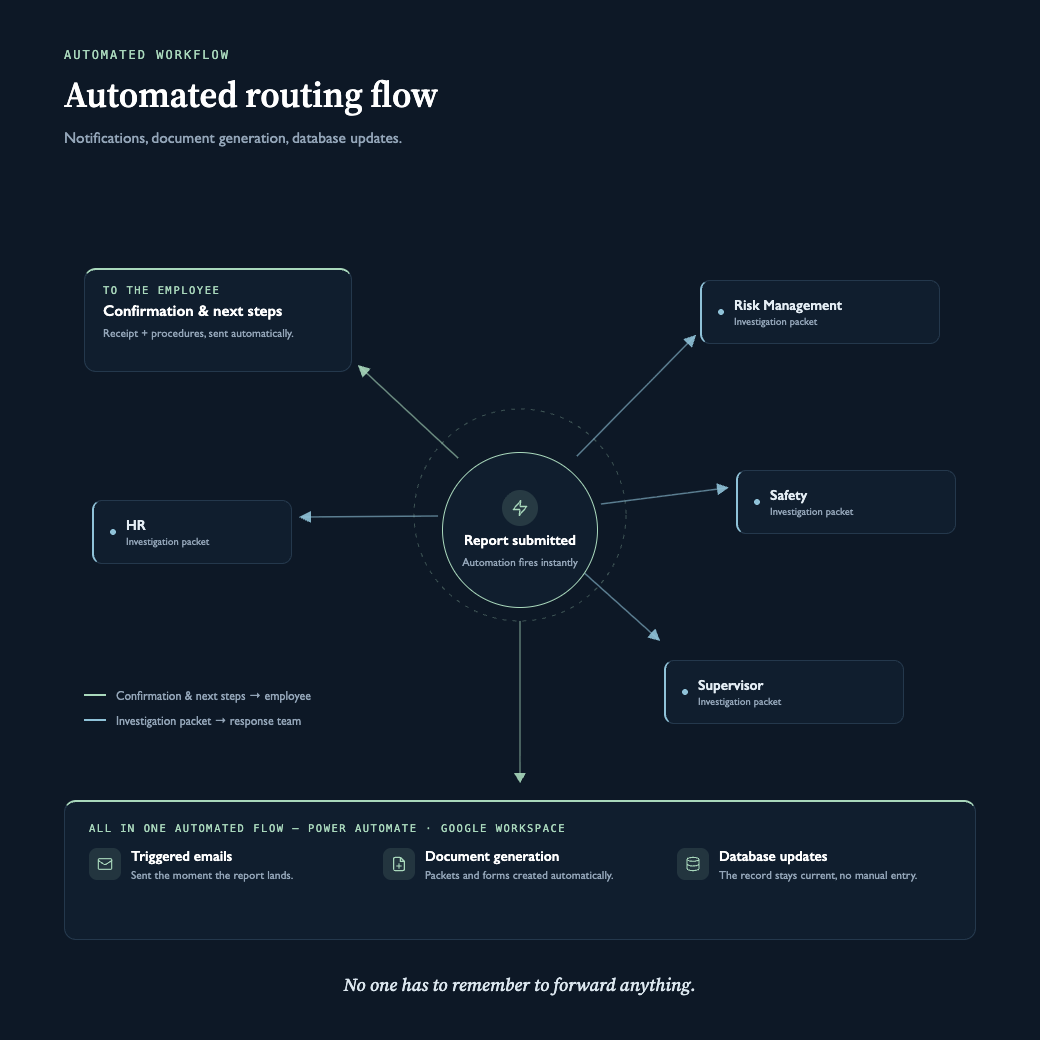
A submitted report triggers a chain of confirmations and notifications. No one has to remember to forward anything.

  • Confirmation and next-step procedures sent to the employee
  • Investigation packet routed to Risk Management, Safety, HR, and the supervisor
  • Built with Microsoft Power Automate or Google Workspace automation
  • Triggered emails, document generation, and database updates in one flow
Automated routing flow: a submitted report sends confirmation and next steps to the employee, and an investigation packet to HR, Risk Management, Safety and the supervisor, with triggered emails, document generation and database updates in one Power Automate or Google Workspace flow
Automated routing flow — notifications, document generation, database updates
03 · Visibility

A live dashboard for the metrics your GM asks about.

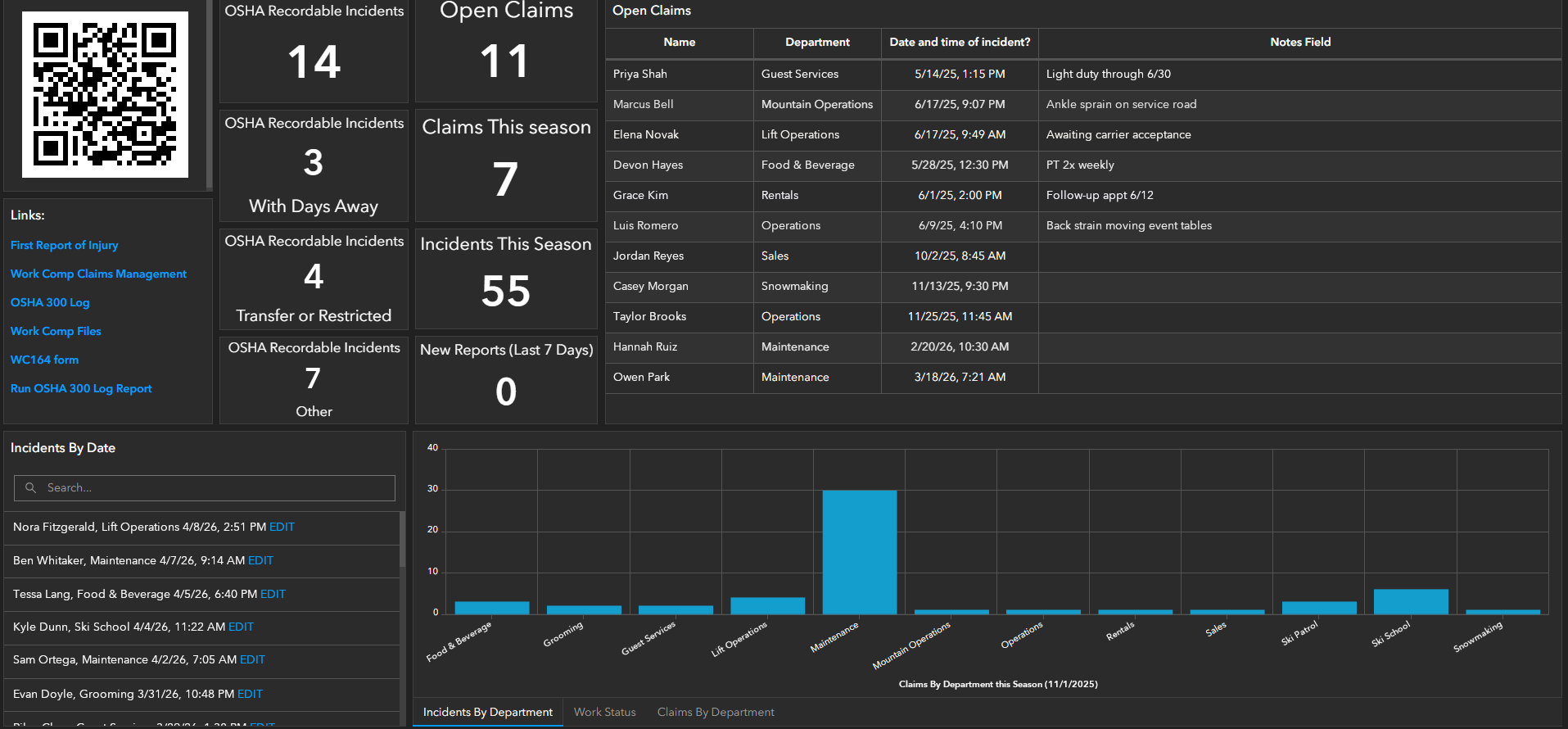
Every report flows into a single database with a dashboard on top — visible in real time, without spreadsheet wrangling.

  • DART and incident-rate tracking
  • Open vs. closed claims, by status and by location
  • Built on Microsoft SharePoint, Google Sites, or ArcGIS Dashboards
  • Drill from a chart into the underlying claim in two clicks
Work Comp dashboard showing OSHA recordable incident counts, open claims, claims and incidents this season, an open-claims table, and incidents by department
Work Comp dashboard — OSHA recordables, open claims, incidents by department (sample data)
04 · Case Management

Manage each claim from intake to close.

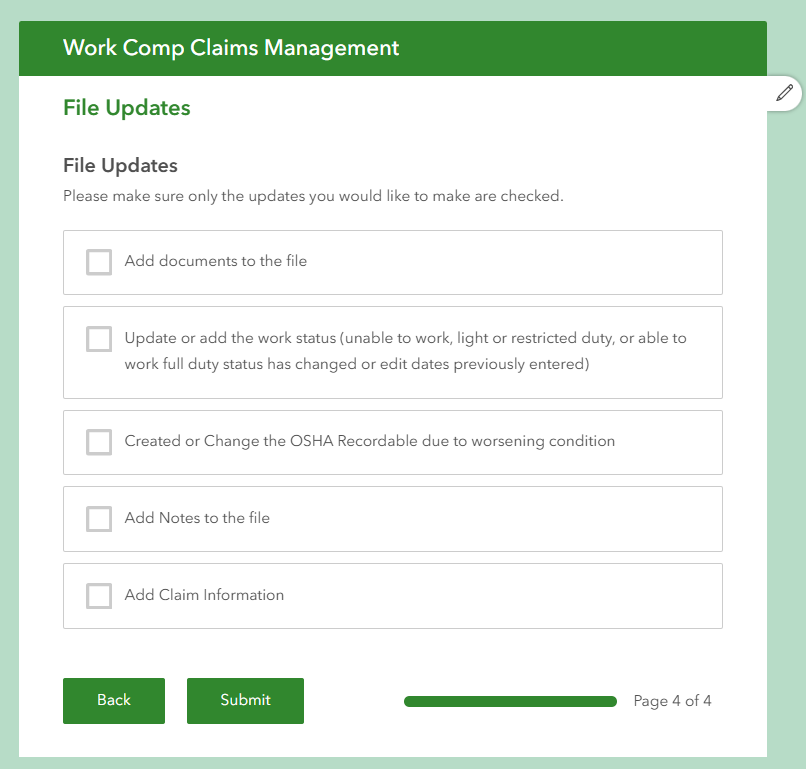
A guided record for every claim, driving both the dashboard and the OSHA log behind the scenes.

  • Attach medical notes, light-duty offers, and supporting documents
  • Track claim number, resolution manager, and status
  • Structured updates feed both the dashboard and the OSHA 300 log
Work Comp claims management form, file updates step: add documents, update work status, change OSHA recordable status, add notes, add claim information
Claims management — choosing which updates to make to a claim file
05 · OSHA

An OSHA 300 log that maintains itself.

The hardest part of compliance becomes the part that happens on its own.

  • Dynamic recommendations on whether a claim is OSHA recordable
  • Days-away and restricted-duty dates pulled from medical notes
  • Automatic DART calculation
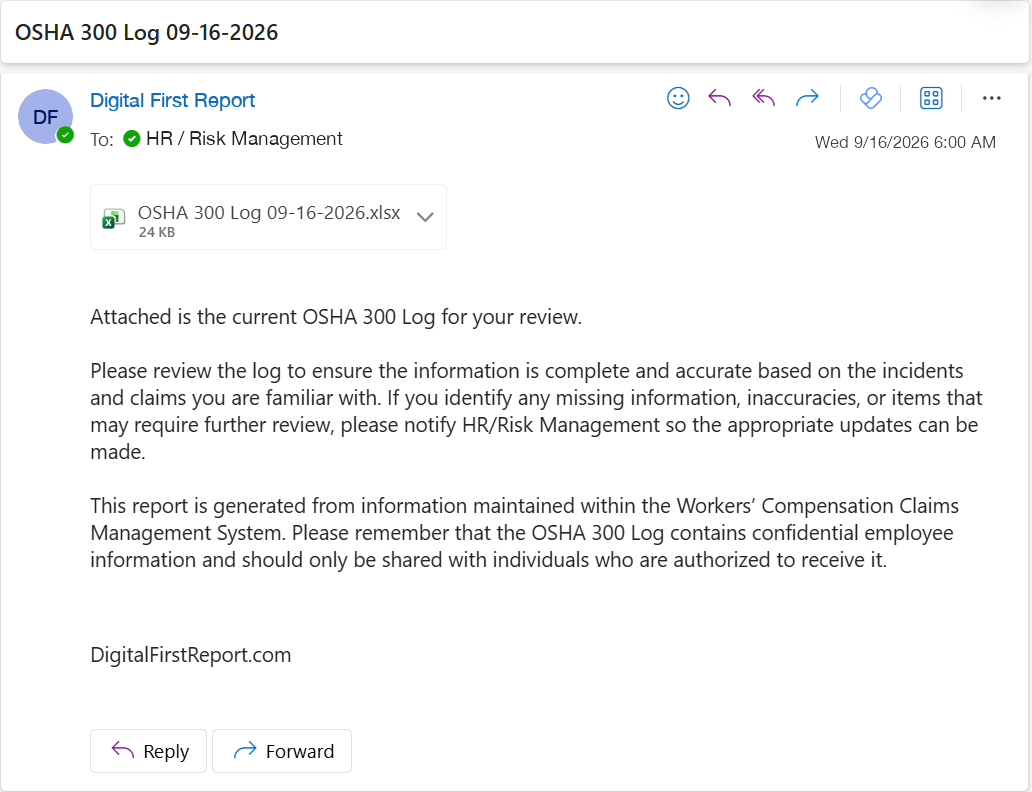
  • Weekly OSHA 300 log emailed automatically
Weekly OSHA 300 log email: sent automatically to HR / Risk Management with the current OSHA 300 log attached as a spreadsheet
Automated weekly OSHA 300 log email with attachment
Results

What changes once it's running.

Increased reporting, with reduced lag time between incident and intake

Faster response to every incident, from the first hour forward

Better documentation across the entire claim lifecycle

Reduced time-to-close on open claims

Lower total cost of claims — increased equity, lower premium

An OSHA 300 log your team stops worrying about

Want to see this running on your operation?

Configurations differ by operation. The fastest way to understand fit is a 30-minute walkthrough with Matt.

No generic demo — Matt will walk through what this looks like configured for your locations, your workforce, and your claims history.

Request a Demo

Also handling guest, patient, or third-party incidents? See Operations & General Liability →