Product · Operations & General Liability

Streamline accident investigations from start to finish.

When an incident happens on your property, every minute matters. Digital First Report automates and organizes the investigation process — so critical information gets collected quickly, accurately, and consistently across every department, without one person carrying the whole thing.

One investigator can't be everywhere. Your departments already are.

Most operations route every guest, patient, or third-party incident through a single risk manager who has to chase down every department for their piece of the story — usually by email, usually after the details have already gone stale.

Digital First Report flips that. Each department completes only the information specific to their role, at the moment it's freshest, into a shared record everyone can see.

When the record is airtight, lawyers and carriers don't want to fight it.

A complete, consistent, timely investigation is your best defense against a claim that grows in the retelling — and your fastest path to closing the ones that don't need to.

The challenge

What breaks down in a guest or third-party investigation today.

One person, every department

A single risk manager coordinating input from Security, Operations, and Guest Services in serial, by email — while the incident goes cold.

Inconsistent report quality

Without guided forms, what gets documented depends entirely on which employee happened to respond and how much training they remember.

No record ready when it matters

By the time a claim or legal request arrives, the pieces are scattered across inboxes — and reconstructing the timeline becomes its own project.

How it works

Investigation built around shared responsibility, not one bottleneck.

01

Pre-loss data & notification

Checklists and operations logs capture pre-loss conditions. The moment an incident occurs, every affected department is notified automatically.

02

Department-specific forms

Investigation forms are emailed directly to each department — no relay through a single coordinator, no waiting in line.

03

One consolidated record

Every department's input feeds the same investigative file — complete, timestamped, and ready the moment you need it.

Dashboards

Every department sees exactly what's on them.

A customized dashboard shows assigned incidents, pending report requests, and open investigation tasks — no digging through email to find out what's needed.

  • Staff see what requires their attention at a glance
  • Complete assigned forms directly from the dashboard
  • Track the status of every ongoing investigation
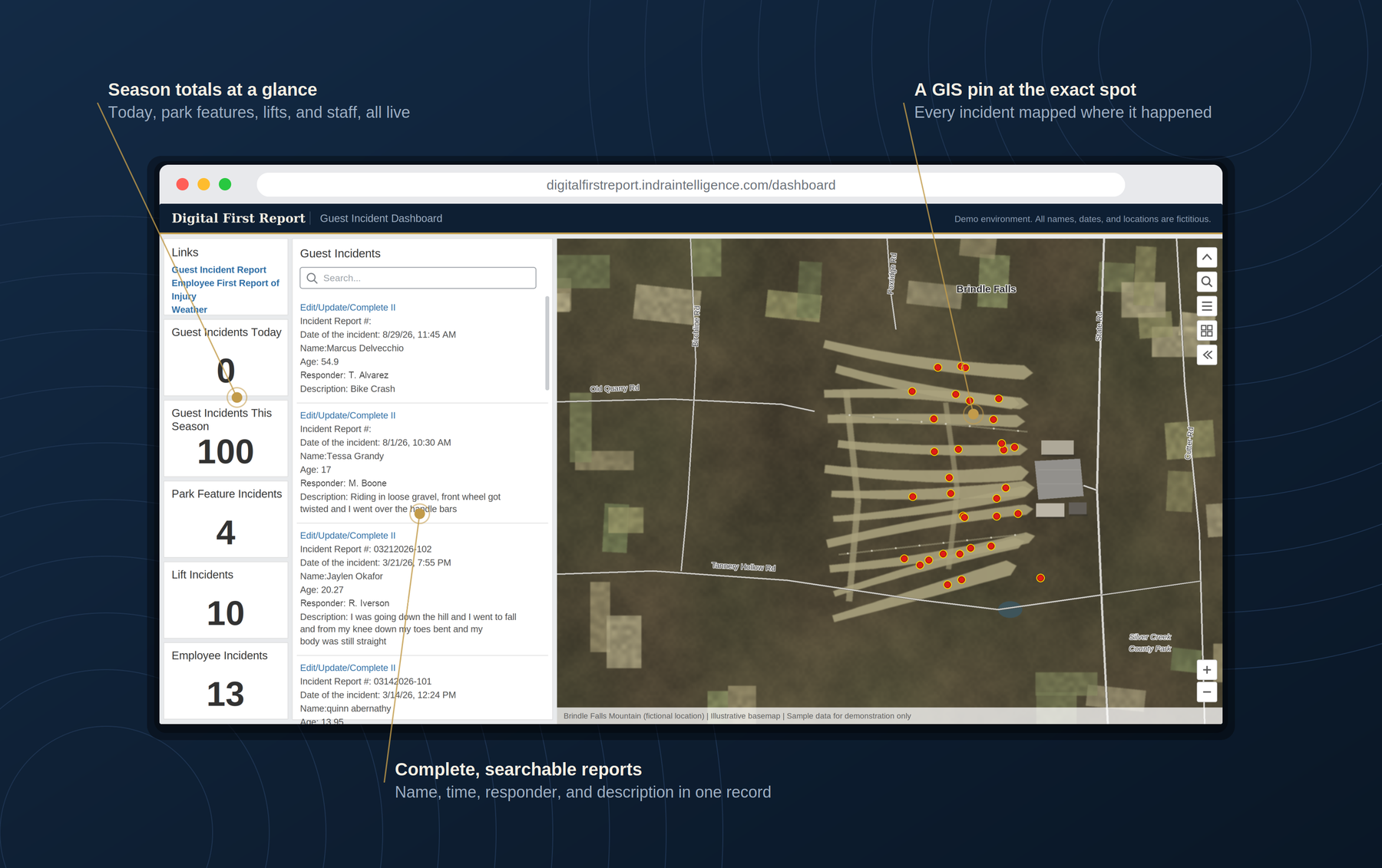
Guest incident dashboard showing incident counts for today and the season, park feature and lift incident totals, a searchable list of incident reports, and a map with a pin at each incident location
Guest incident dashboard — season and daily counts, searchable reports, and a map pin for every incident (demo data)
Guided forms

Built-in instructions, so quality doesn't depend on who responds.

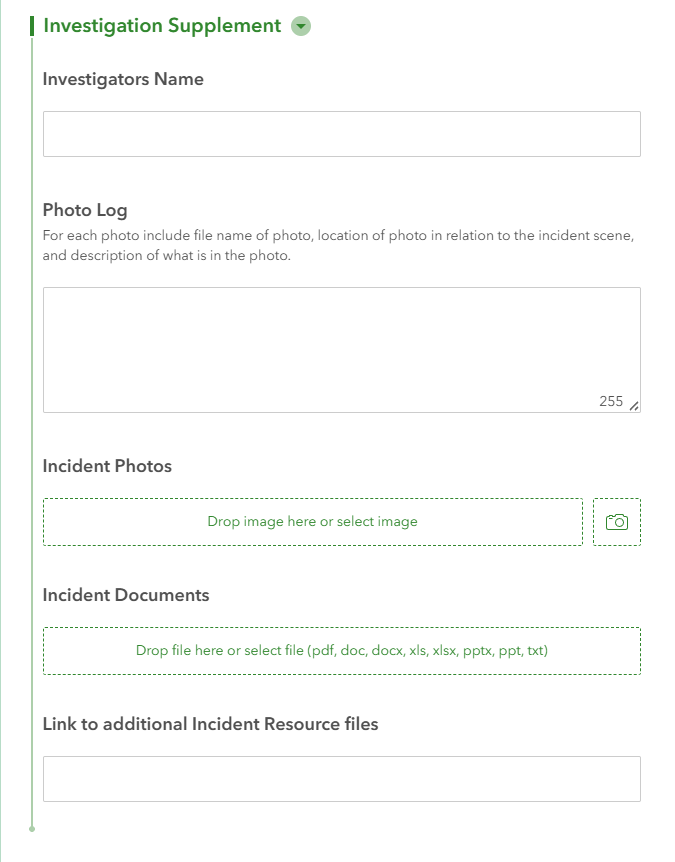
Every form guides employees through the required information, reducing training burden and standardizing documentation across the property.

  • Minimizes missing or inconsistent information
  • Reduces the training required for new or seasonal staff
  • Standardizes documentation across every location
Investigation supplement form: investigator's name, a photo log with instructions on what to record for each photo, and upload fields for incident photos and documents
Guided investigation form with built-in field instructions
Configuration

Built around how your operation actually runs.

No two properties operate exactly the same way. Every workflow, form, dashboard, and reporting requirement is configured to match your existing policies and organizational structure.

  • Departments, forms, and routing match your org chart, not a template
  • Custom forms for any department beyond the standard set
  • Grows with your operation as departments or locations are added
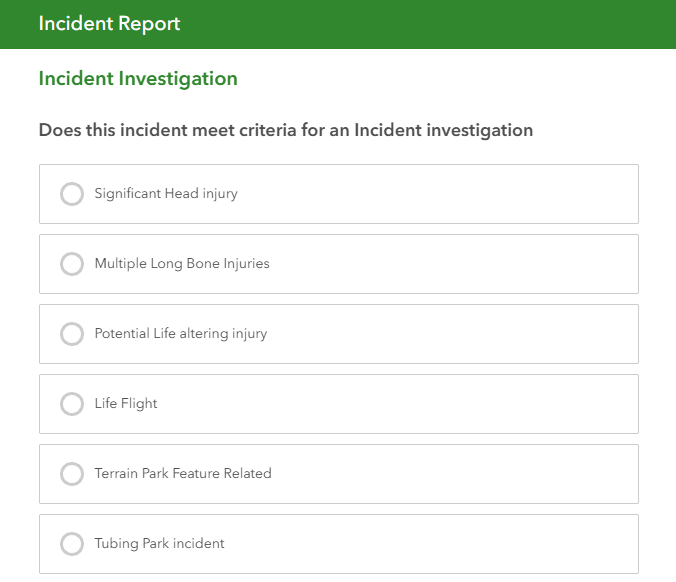
Incident investigation criteria: options for significant head injury, multiple long bone injuries, potential life-altering injury, life flight, terrain park feature related, and tubing park incident
Investigation criteria configured to the property — terrain park, tubing park, and injury thresholds
Use case in detail

What department-based investigation looks like on the ground.

Security and emergency-response workflows carry the same structure whether the property is a ski resort or an entertainment venue — the departments and the forms are simply named differently.

Ski Patrol

Guest incident reports

Detailed on-mountain incident investigations, completed by the department first on scene.

Rentals

Equipment inspections

Post-accident equipment inspections logged and attached directly to the incident record.

Lift Operations

Lift incident reports

Lift incident reports and daily operational logs, feeding the same shared record.

Ski School

Client incident reports

Instructor-completed reports for client incidents during lessons or programs.

Additional Departments

Custom forms

Any other department — Food & Beverage, Parking, Guest Services — configured to your resort's needs.

Results

What changes once investigations run this way.

No single point of failure — the investigation doesn't stall waiting on one person

Faster, more accurate investigations from every department involved

Consistent report quality that doesn't depend on who happened to respond

A complete investigative record, ready before legal or the carrier asks for it

Staff who get comfortable with the process through routine use, not a crisis

Improved compliance and documentation across every location

Want to see this running on your operation?

Every operation's departments and forms are different. The fastest way to see this configured for yours is a direct walkthrough with Matt.

No generic demo — Matt will map the workflow to your actual departments, forms, and reporting structure.

Request a Demo

Also managing employee injuries and Work Comp claims? See Workplace Injury & Work Comp →